
WageWatch helps hourly workers in the United States check whether they are paid what the law requires. Workers log their schedules and hours in a mobile app. WageWatch computes what each pay period should have paid under the labor laws that apply where they work, and flags the period when the gross on their pay stub is lower. A worker who finds a discrepancy can ask, from the app, to be contacted for a legal review.
The product has three parts: a React Native app for workers (iOS and Android, in English and Spanish), a web dashboard for the WageWatch team, and a Node.js API that owns the data and the rules engine, which turns federal, state and local wage law into data the system can evaluate.
What a worker can do
- Describe the job once: employer and workplace address (with Google Places autocomplete), industry, the wage and how it is expressed (hourly, daily, weekly, bi-weekly, monthly or annual), pay frequency and pay day, and the break policy.
- Schedules instead of timesheets: a weekly or monthly schedule fills every pay period automatically. The worker only edits the days that were different, and adds breaks, tips and extra compensation such as bonuses.
- Several roles in one job: each time frame of a day can carry a job title or a piece of equipment with its own wage.
- Discrepancy detection: entering the gross from the pay stub compares it with the calculated gross for that period.
- Legal review on request: the worker can ask to be contacted about a discrepancy. Logging data alone never triggers a contact.
Architecture on AWS
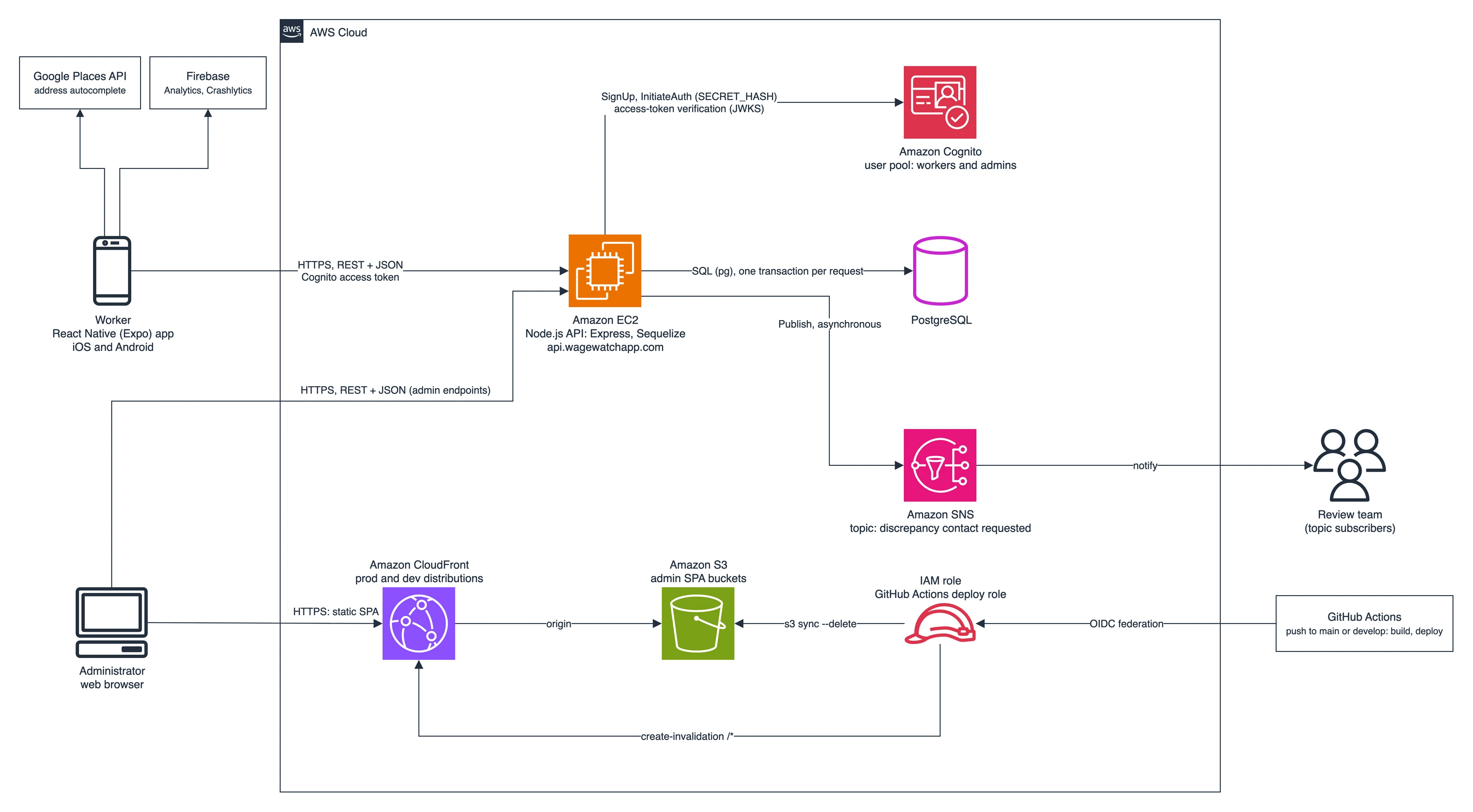
- Managed identity behind the API: workers and administrators live in one Amazon Cognito user pool. The apps never talk to Cognito directly: the API signs users up and logs them in with the app client's secret (
SECRET_HASH), and every protected route verifies the Cognito access token withaws-jwt-verifybefore mapping itssubto a user. - A stateless API: Express, Sequelize and PostgreSQL on Amazon EC2, authenticated by bearer tokens only. Each write runs in a single database transaction, together with the pay-period recalculation it triggers.
- Notifications decoupled through SNS: when a worker asks for a review, the API publishes to an SNS topic and answers without waiting for delivery. Who receives it is configured as topic subscriptions in AWS, not in code.
- The admin dashboard is a static site: the React dashboard (TanStack Router, Query and Table) is built by GitHub Actions and synced to S3 behind CloudFront, with production and development environments selected by branch. The workflow authenticates to AWS with a dedicated IAM deploy role through GitHub's OIDC provider, so no long-lived AWS keys are stored in the repository.
- Mobile release variants: Expo EAS builds development, preview and production variants, each with its own bundle identifier and Firebase configuration. Firebase Analytics and Crashlytics report usage and crashes.
Inside the API
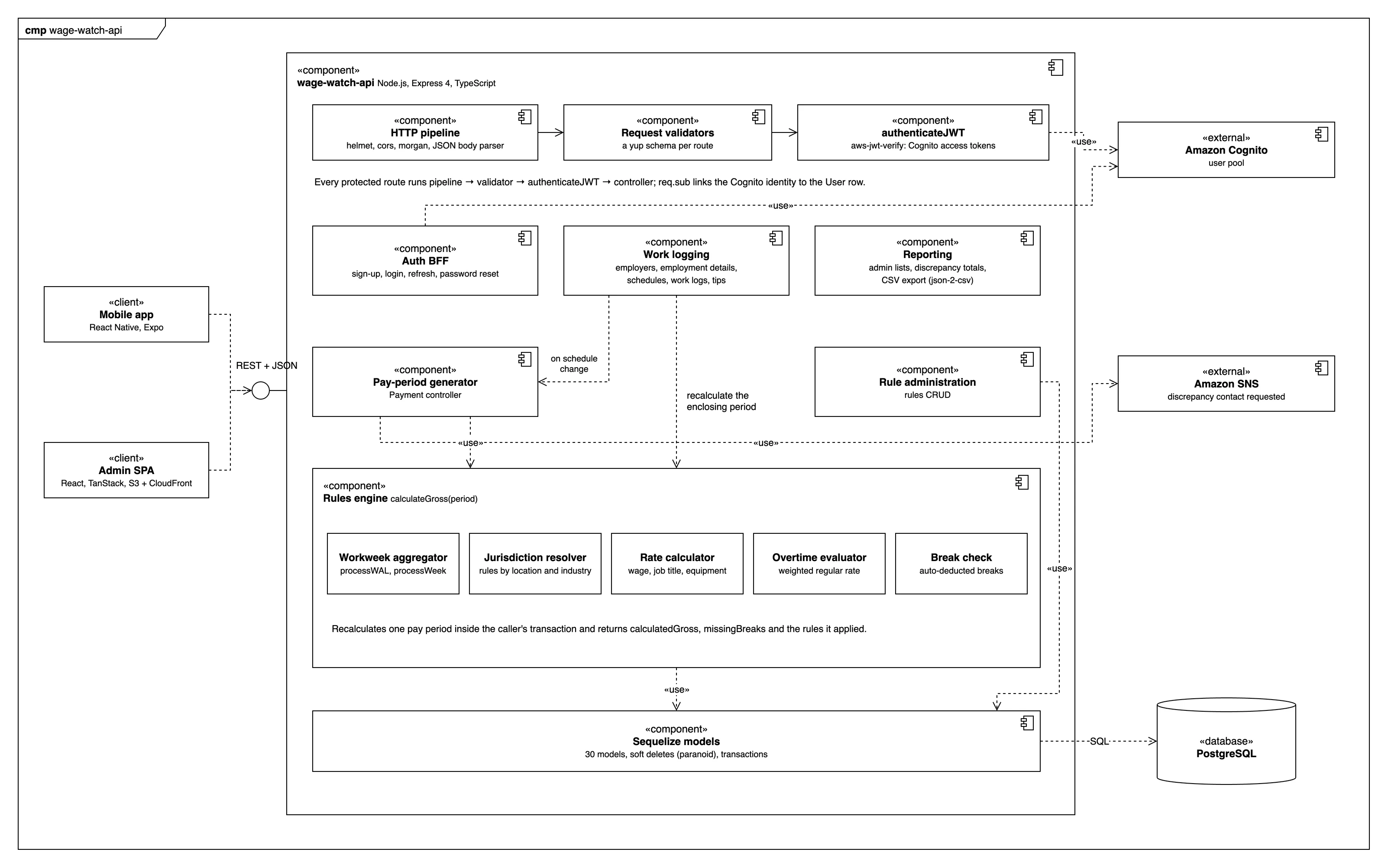
The API is organized by resource (routes, a yup validator per route, controllers and Sequelize models), which groups into the components below. Models are paranoid, so deletes are soft and a worker's history stays available for the records behind a legal review.
The rules engine
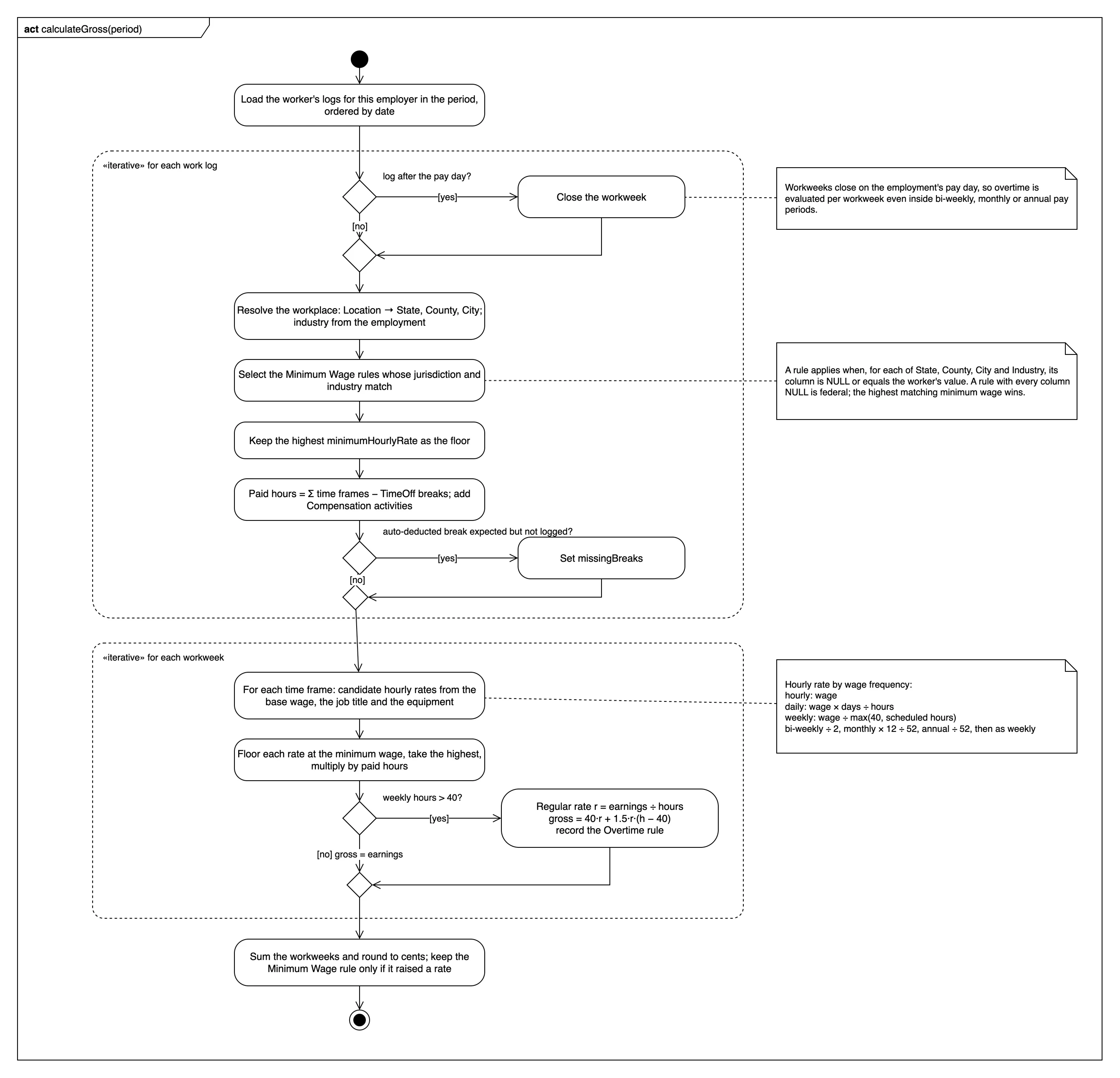
US wage law is layered. Federal law sets a floor, and states, counties and cities can raise it, sometimes only for certain industries. Hard-coding those rules would have meant a release for every new law, so every law is a row in a Rule table and the engine evaluates rows.
- Laws as data: a rule has an entitlement type (minimum wage, overtime or meal break), a statute reference, an effective date, its values (such as the minimum hourly rate) and four optional scope columns:
StateId,CountyId,CityIdandIndustryId. The table also has columns for other kinds of law, such as rest periods, shift conditions, tip credits and predictability pay, so they can be recorded without changing the schema. Today the engine evaluates minimum wage and overtime, and checks breaks. - NULL means “applies everywhere”: a rule matches when each scope column is NULL or equals the worker's value, as in
(CityId = :city OR CityId IS NULL). A rule with all four columns empty is federal, a rule with onlyStateIdcovers the whole state, and settingCityIdorIndustryIdnarrows it. The minimum wage is resolved from the location of each work log, so a worker who works in two cities is evaluated under each city's law for the days worked there. - The most protective law wins: when several minimum wages match, the engine takes the highest, which is how federal, state and local minimums combine. The rate paid for a time frame is the highest of the base wage, the job-title wage and the equipment wage, each converted to an hourly rate and raised to that floor.
- Overtime per workweek: workweeks close on the employment's pay day, so a bi-weekly, monthly or annual pay period is split into workweeks and overtime is evaluated for each one. Above 40 hours, the engine computes the regular rate as a weighted average of everything earned that week, compensation included, and pays 1.5 times that rate for the extra hours, following the federal overtime rules.
- Traceable results: each pay period stores its calculated gross and a discrepancy log linked to the rules that produced it. The minimum wage rule is linked only when it actually raised a rate. The admin CSV export lists those entitlements next to the schedule, logged hours, wage terms and entered gross: what a reviewer needs to assess a case.
Flows
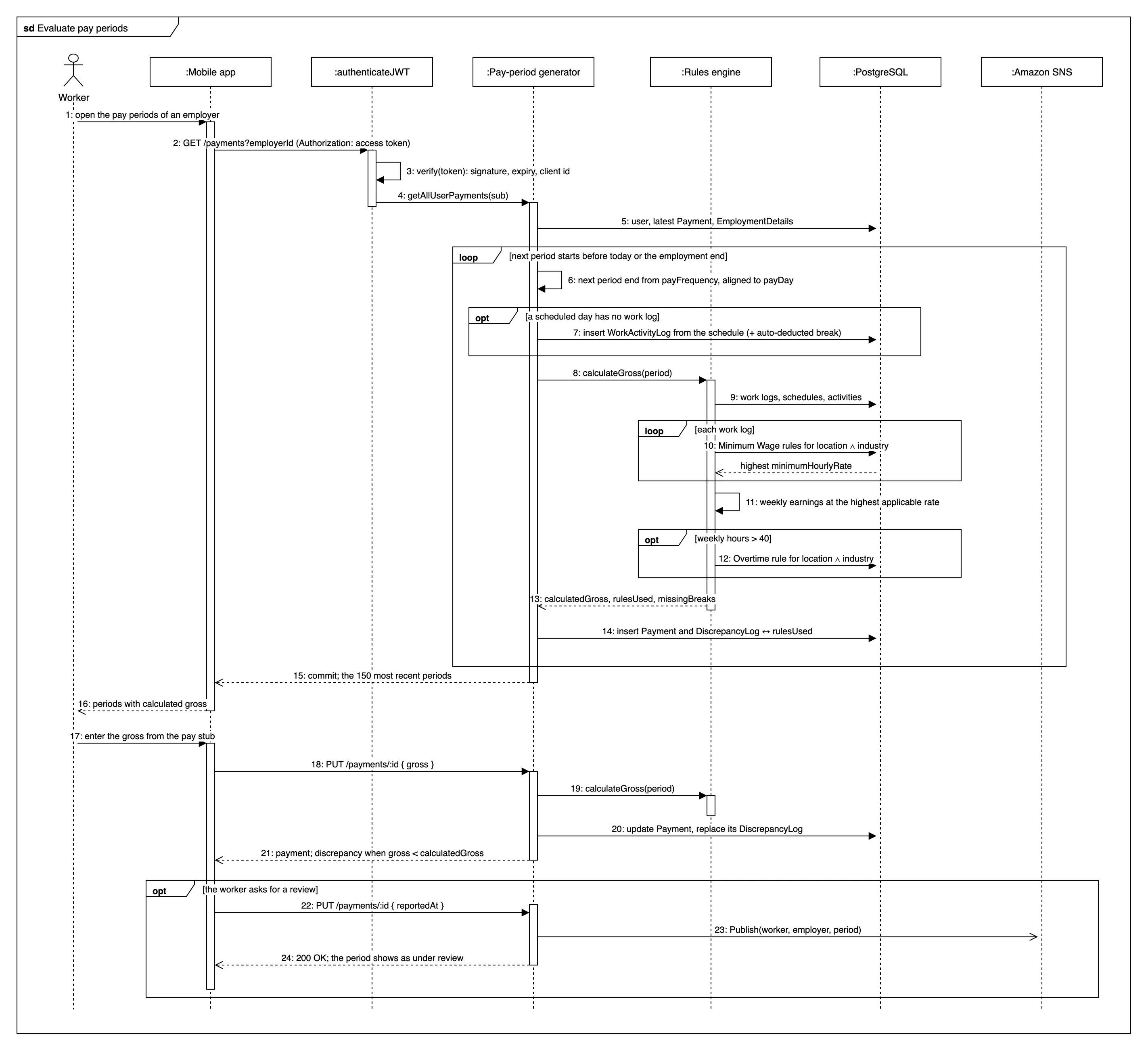
- Pay periods are generated on read: when the app asks for a worker's pay periods, the API walks forward from the last stored period (or from the start of the employment, at most three years back), cuts periods by pay frequency aligned to the pay day, fills scheduled days that have no log from the schedule, and evaluates each new period. Nothing runs on a timer, and a worker who comes back after months finds every period ready.
- Every edit re-evaluates its period: creating, editing or deleting a work log recalculates the enclosing period and replaces its discrepancy log in the same transaction, so the stored result always matches the logs.
- Schedule changes regenerate history: changing a schedule from a date onward rebuilds the affected periods and their logs from the new schedule, and keeps the gross the worker had already entered.
- Discrepancy and review: a period is a discrepancy when the entered gross is below the calculated gross. Asking for a review stamps the period, publishes to SNS, and the app shows the period as under review.
- Data repairs with a dry run: fixes to historical data, such as duplicate periods or logs and hours with breaks deducted twice, ship as scripts that preview every change before anything is written.
My role
WageWatch was built at Código del Sur by a small team, and I was one of its core engineers, working across the whole product rather than a single layer. On the API, I designed the first version of the rules engine: the extended rule schema, the rule endpoints and the query that selects the rules valid for a worker's context. That set the shape the engine still has, with laws stored as rows and matched against each worker. I also built the referral-code sign-up, the employment-details history and the API's validation errors. On the mobile app, I owned large parts of the worker experience (onboarding, schedules, the calendar, sign-in and password recovery, and the legal screens) and iterated on them directly with the client through each feedback round.
View the project on: wagewatchapp.com